The department's equipment lending lived inside a legacy platform module with messy data, and the shared meal fund was a hand-maintained spreadsheet. This system took over both: formalizing lending (overdue, compensation, stocktakes, kits) and turning the fund into real ledger accounting with balances, settlement periods and cash verification.
02
02 / ConstraintsCONSTRAINTS
Had to absorb the legacy database — old borrowing records were riddled with empty fields.
Front-desk lending is high-frequency and run by non-technical staff — each transaction must finish in seconds.
One VPS, no containers or Redis: caching is in-process LocMemCache, with rate limits on a DB cache to share across workers.
03
03 / ArchitectureARCHITECTURE
A Django 5 + DRF modular monolith split into 13 domain apps (borrowing, finance, audit, inventory, kits…) — 28 models, 24 resource routes plus 87 custom actions — with a React 19 + Ant Design frontend of 40 pages. JWT lives in HttpOnly cookies with refresh rotation and blacklisting; RBAC is modeled as Roles and Capabilities.
Auditing is its own subsystem: middleware records every operation (sensitive-action flags, latency, response status), plus field-level model change logs. The finance subsystem runs the meal fund: transactions maintain account balances on write, with settlement periods and cash verification — and the whole ledger can be rebuilt from the original spreadsheet in one import.
04
04 / ResponsibilitiesRESPONSIBILITIES
Independent full-stack development (single author across the entire git history, 2025/09–2026/07): data models, APIs, permissions, the React frontend, test strategy and deployment (nginx + gunicorn under systemd).
05
05 / Challenges and solutionsCHALLENGES → SOLUTIONS
CHALLENGE
Legacy borrowing records had to move into the new schema, but the data was too dirty to import directly.
SOLUTION
Built a migration toolkit (one mapper per entity, a standalone verifier, dry-run and reports), keeping the legacy DB behind its own connection. One real run took 180 seconds and moved 9,138 borrow tickets, 3,336 students and 370 pieces of equipment — while 2,271 legacy rows failed on empty fields. Those errors live in the migration report as tracked data-quality debt, not swallowed.
CHALLENGE
The front desk needs speed — manual entry was too slow, and desktop and mobile scan with entirely different hardware.
SOLUTION
Made the whole flow barcode-driven: the backend generates Code128 labels; the frontend auto-switches by device — scanner-gun input on desktop, camera (@zxing) on mobile — with batch scanning and short-window dedup. One scan pulls up the equipment and its ticket.
CHALLENGE
Years of old and new records were tangled in the meal-fund spreadsheet — formalizing it couldn't lose a single row.
SOLUTION
Wrote a two-pass import command: pass one creates accounts and categories, pass two handles opening balances, settlement periods and every transaction — all inside a DB transaction, with dry-run and re-runs. Balances maintain themselves on write, and month-end cash verification closes the loop.
06
06 / System factsSYSTEM FACTS
13
domain apps
86
custom API actions
1,181
backend test functions
36
Playwright E2E specs
07
07 / LessonsLESSONS
Migration guards belong in the mapper: the 2,271 failures were nearly all one class of empty-field problem — clean first, import second, and that error report never exists.
Silencing errors into 'everything is fine' is worse than breaking. The duplicate pages and fake-data displays a late UX audit surfaced are debt from the fast-stacking phase — now numbered, listed, and being paid down.
08
08 / ScreensSCREENS
All screens below show demo (mock) data — no real user data.
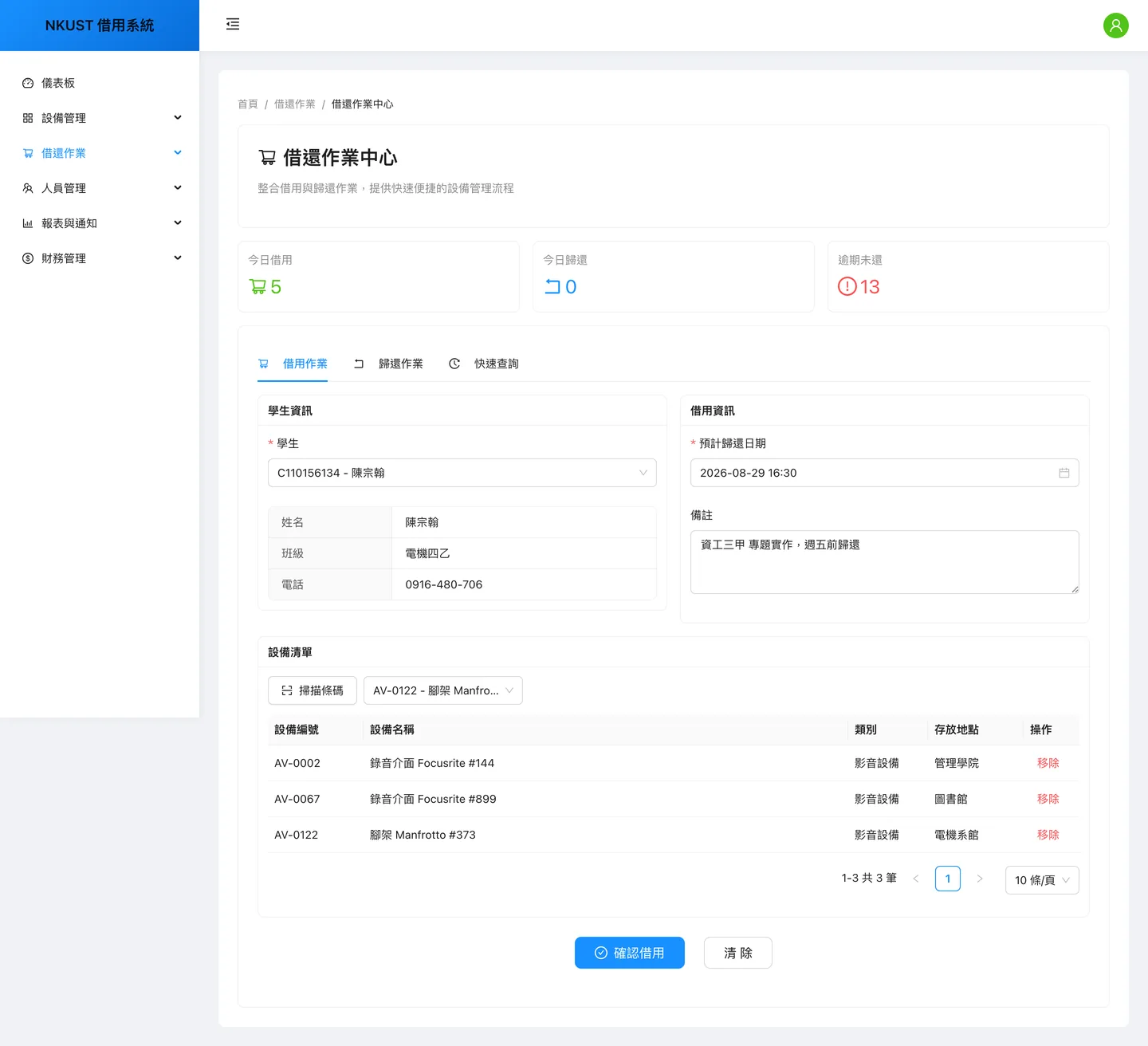
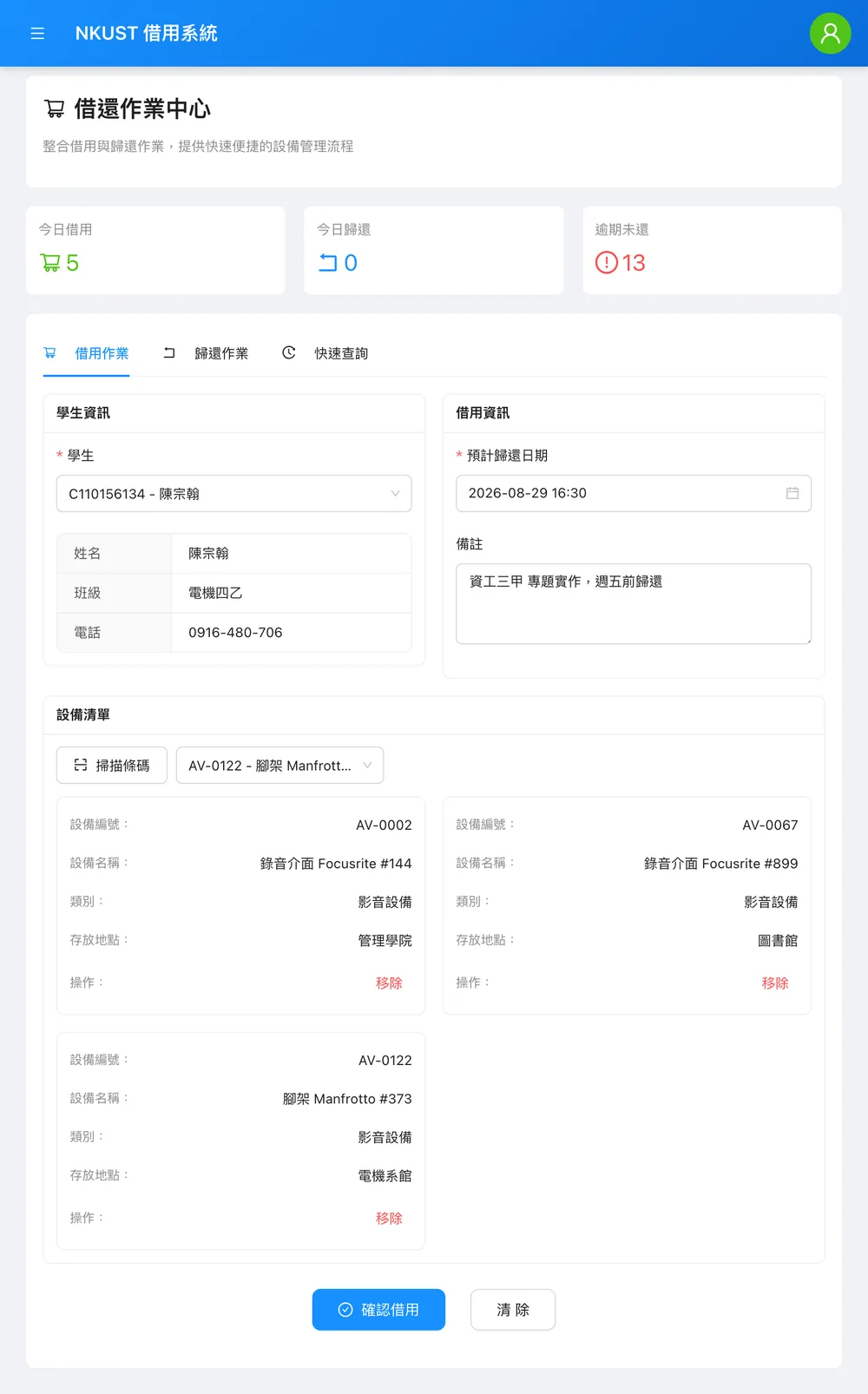
The front-desk borrow flow driven to its last step: searching a student pulls in class and phone, three items go into the cart, and only 確認借用 remains. It was deliberately not clicked, so nothing on screen is a committed write. The "13 overdue" tile at the top is computed on the fly, not a stored column.
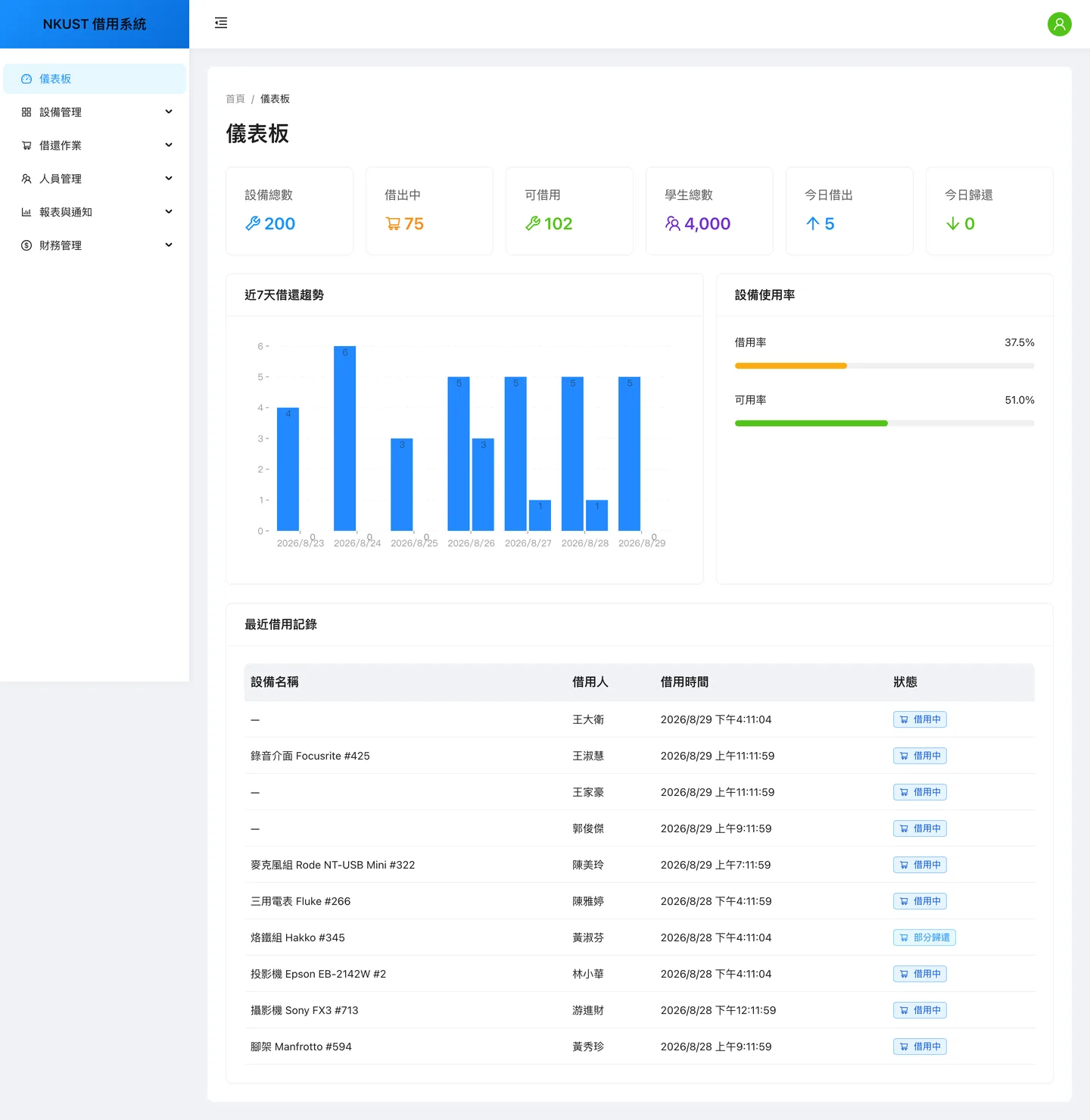
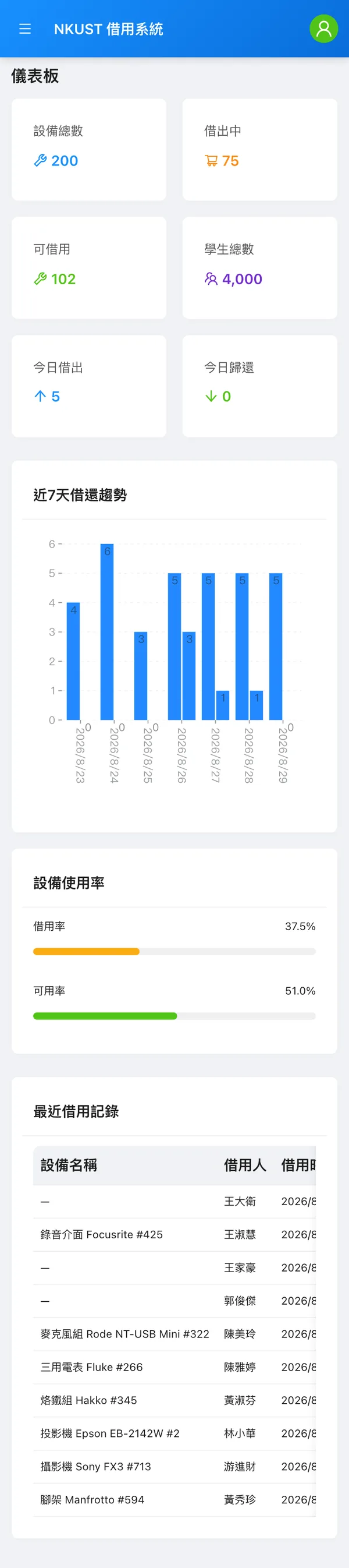
The dashboard puts six KPI tiles, a seven-day trend chart, utilisation bars and recent activity on one page. This capture ran against synthetic seed data on a throwaway SQLite file — the 200 items and 4,000 students are Faker-generated; the project itself runs on MySQL.
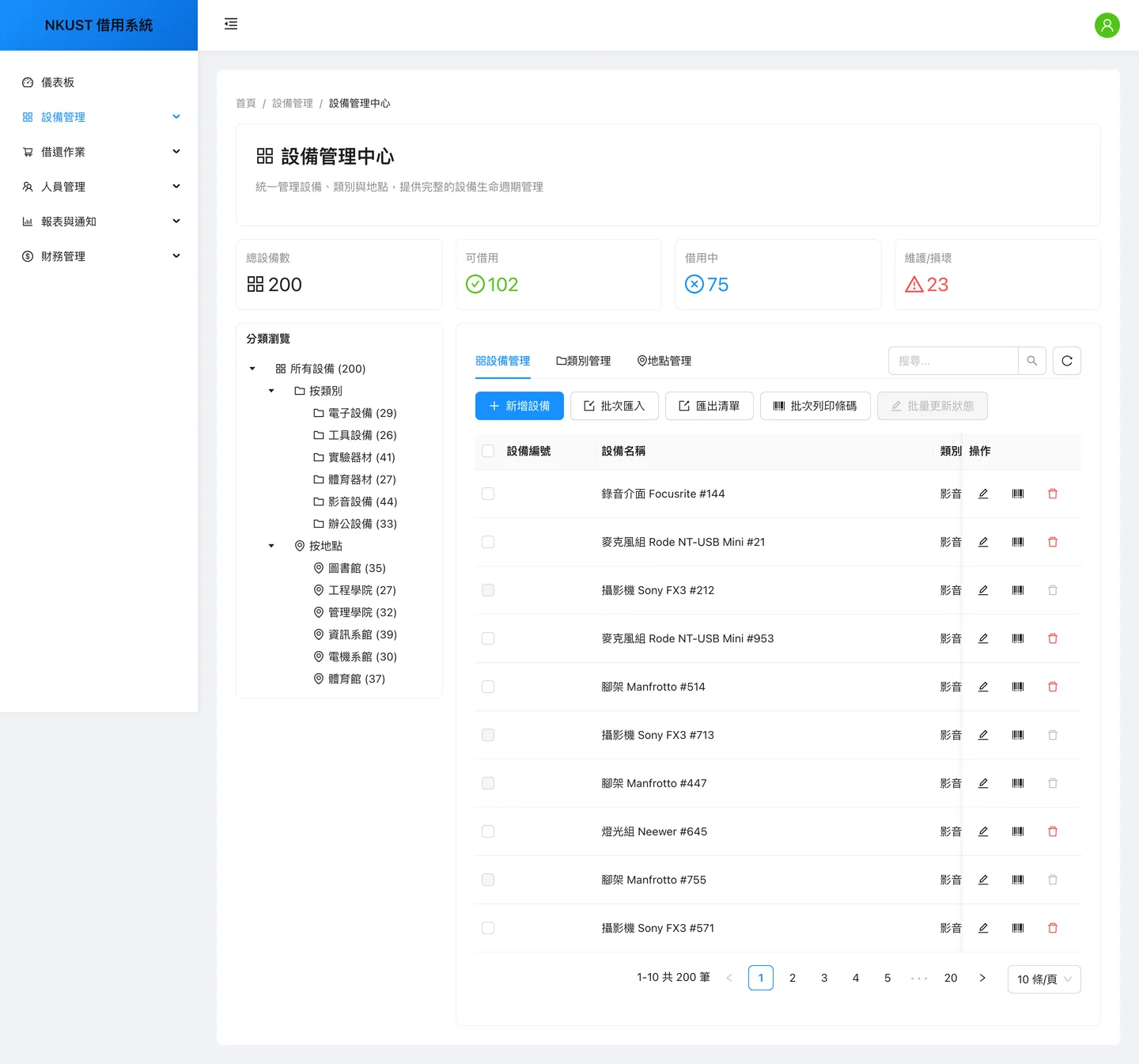
Equipment management: the tree on the left slices the catalogue by category and by location, while the right side carries 200 rows plus batch import, export and batch barcode printing. The 設備編號 column is blank — a real bug caught during capture: the column declares dataIndex `code` while the API serialises the field as `serial_number`. The data is in the response; the column reads the wrong key. It was left alone rather than patched to flatter a screenshot.
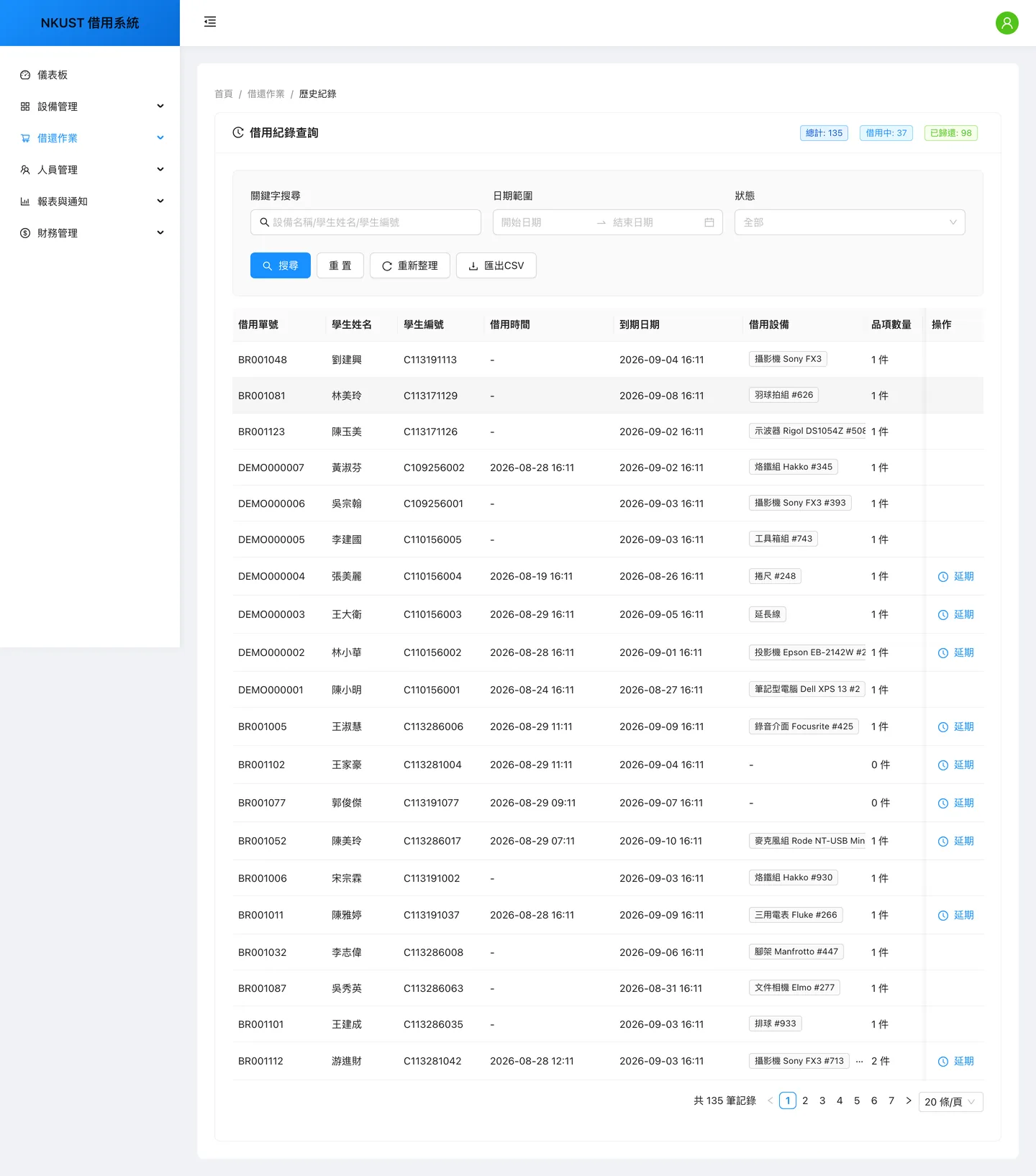
Borrow-record search: keyword, date-range and status filters plus CSV export over a paginated 135-row table. Only eligible tickets show the extend action — the backend caps a single extension at 1 to 30 days and rejects anything outside that range at the API.
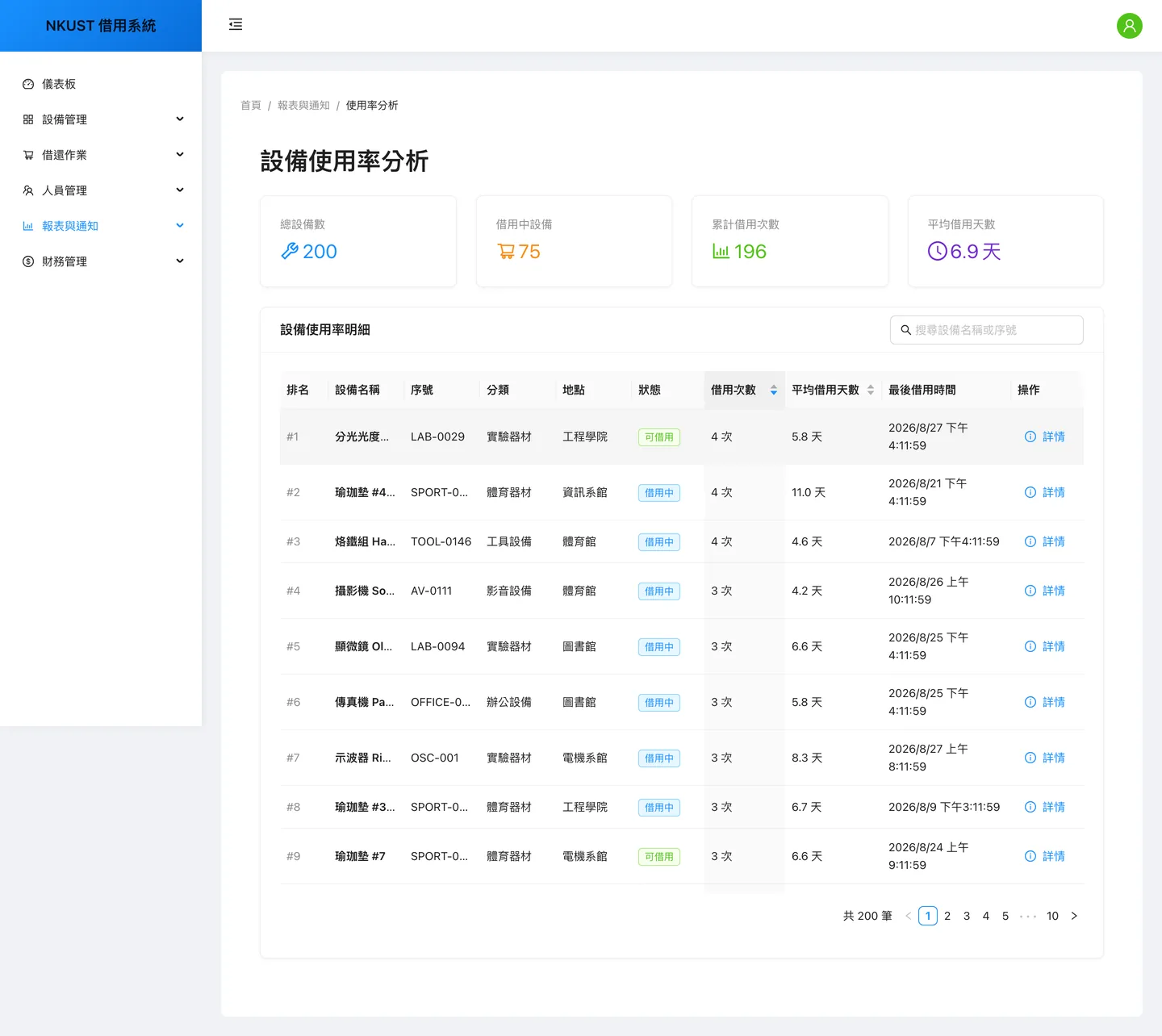
The utilisation report ranks all 200 items by cumulative borrow count, each row carrying average borrow days and last-borrowed time — enough to tell the hot items from the shelf-warmers. Worth noting: the serial number renders correctly here. Same API payload; this page’s column config simply does not hit the wrong-key bug the equipment table does.
The same borrow screen at an 834px tablet width: the sidebar collapses to a hamburger and the equipment cart drops its table for two columns of label/value cards. Not a table shoved into a horizontal scroller — a different layout for the same data.
The same dashboard at a 390px phone width: KPI tiles reflow to two columns, the chart rotates its date labels, and the remaining blocks stack in order. All three widths — desktop, tablet, phone — come from one Playwright run against the live app, not from a resized mockup.
09
09 / Architecture diagramsARCHITECTURE DIAGRAMS
Every diagram below is derived from the project's actual source; each node traces back to a real file. They are wide — scroll sideways, or click to open the full-size SVG.
One borrow ticket drives three state machines at once — six ticket states, four line-item states, four equipment states — with each transition labelled by the endpoint that fires it. Two things only become visible once it is drawn: overdue is not a stored field at all but derived from status plus due_at (served by the borrow_status_due_idx index), and the lost / damaged line states, though defined and readable by the filters, have no production path that ever writes them.
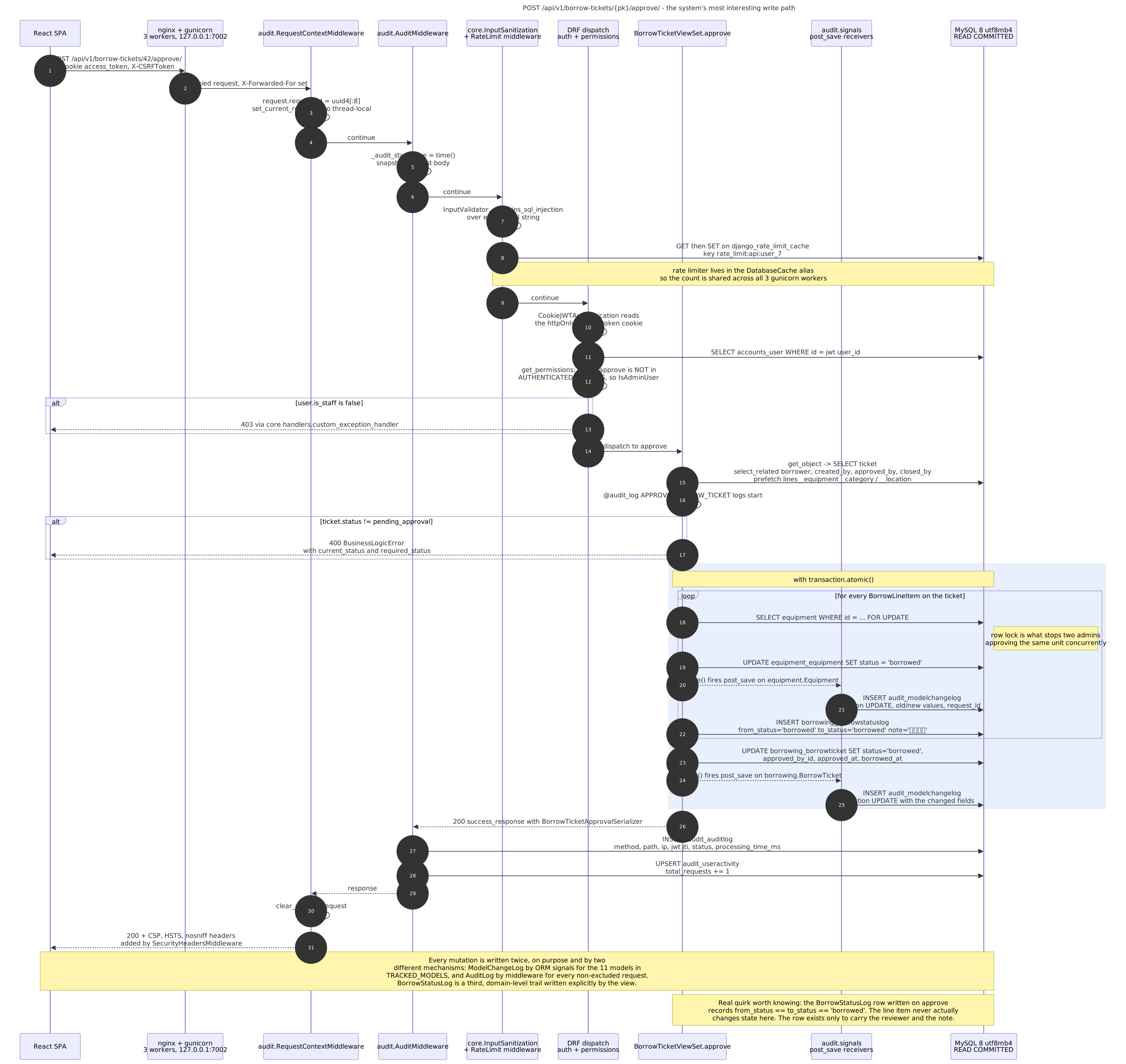
The full round trip of POST /borrow-tickets/{id}/approve/, nginx to MySQL — the most interesting write path in the system. Approval takes a SELECT … FOR UPDATE row lock per line item, and that lock is exactly what stops two admins double-issuing the same unit. A single approval then gets recorded three times by three independent mechanisms: ModelChangeLog from ORM signals (11 tracked models), AuditLog from middleware, and a domain-level BorrowStatusLog written explicitly by the view.
Authorization is four layers stacked: the middleware chain, three authentication backends tried in order, DRF permission classes, and per-row scoping inside the view (a non-admin sees only tickets they created). The right-hand column maps route by route which layer each endpoint actually lands in. The figure also marks where RBAC stops: Roles and Capabilities are modelled, seeded and returned to the SPA so it can grey out buttons, but the only server-side code that reads a capability is the backups module — everything else effectively gates on is_staff. That is the current design, not a drafting error.
What actually runs on a single VPS: Cloudflare → nginx → three gunicorn sync workers → MySQL 8, with thirteen domain apps sharing one process. The figure deliberately draws the absences too: no Celery, no Redis, no scheduler — so overdue mail, Excel export, PDF barcode labels and the demo reseed all run synchronously inside the web worker, and the rate-limit DatabaseCache is the only state shared between workers. The shape of the constraint is the shape of the architecture.
The core domain schema, drawn with real MySQL table names and column types — the repo overrides no db_table anywhere, so the names in the figure are the names in the database. Two design decisions read most clearly here: a line item’s equipment_id is nullable so unregistered ad-hoc items like chairs and keys can ride on the same ticket, guarded by two partial unique constraints against duplicate equipment and duplicate ad-hoc names; and master data is wired with PROTECT, so a piece of equipment someone has borrowed cannot be deleted out from under its history.