13 / WORK / CASE STUDY

EcoBǎo Food-Surplus Marketplace

A marketplace matching shops’ surplus food with buyers — consumer and merchant portals. Recently refactored into a standalone front-end demo with a unified design system, opened up as a public portfolio piece.

TYPE
FULL STACK
SCOPE
Food-surplus platform · modernization
STACK
REACT · VITE · TAILWIND · REACT NATIVE · DJANGO · DRF
LINKS
LIVE

01 / PROBLEM

EcoBǎo is an ordering-and-matching marketplace built around food surplus — shops sell same-day unsold-but-fresh meals at a discount as “deals” or “surprise bags,” and buyers pick them up in a set window, cutting food waste. It spans three codebases: a React web frontend, a React Native (Expo) app and a Django REST backend, serving consumer and merchant sides. This round of work was about turning that student-era project into something presentable as a public portfolio piece.

02 / CONSTRAINTS

  • The web frontend was hard-wired to the backend: it hit an ngrok URL via axios, so the whole site went blank without a live server — impossible to demo standalone. To become a portfolio demo it had to run without any backend and deploy to static GitHub Pages hosting.
  • The existing frontend mixed four styling systems at once — MUI, Ant Design, Bootstrap and styled-components — producing inconsistent visuals and a heavy bundle.
  • All three repos were going public, but the backend hardcoded its SECRET_KEY, database credentials and mail settings in source — open-sourcing as-is would leak configuration.

03 / ARCHITECTURE

The web app was migrated from Create React App to Vite, the four UI libraries removed, and everything consolidated onto a single Tailwind design system. The visual language was rebuilt from a UX assessment into “Eco-Fresh”: emerald primary with a warm-amber food accent, Noto Sans/Serif TC for Chinese, tokens driven by CSS variables and shared across web and app, with dark mode and prefers-reduced-motion support.

To cut the backend dependency, a pure front-end mock API and seed dataset (stores, surplus items, campaigns, reviews, orders, members) was added — simulated latency plus localStorage persistence reproduce cart, checkout and pickup-code flows. Routing moved to HashRouter for GitHub Pages compatibility, with GitHub Actions building and deploying automatically.

The backend (Django 4 + DRF) had all sensitive settings — SECRET_KEY, database, mail and API keys — extracted into environment variables with an .env.example; requirements and a full README were added, test leftovers and unused modules removed, and accidentally-tracked __pycache__ and assets untracked. The Expo / React Native app adopted the shared design tokens and UI atoms, unifying navigation and styling.

04 / RESPONSIBILITIES

This modernization round — the web Vite migration and Eco-Fresh design system, the pure front-end mock/seed and GitHub Pages deployment, the backend secret-extraction and docs, and applying the shared design language to the app — was led and completed by me; the original platform was a team capstone and competition project from my studies.

05 / CHALLENGES → SOLUTIONS

CHALLENGE

The frontend was welded to the backend and went blank offline — no way to demo it on its own.

SOLUTION

Inserted a mock API layer between data and views with the same signatures as the real backend, but reading front-end seed and persisting through localStorage; cart, checkout, pickup codes and the merchant dashboard all run end-to-end with no backend, deployable as static files.

CHALLENGE

Four coexisting UI libraries left the visuals fragmented and expensive to maintain.

SOLUTION

Started from a UX assessment to define the Eco-Fresh tokens, then built a Tailwind component kit (buttons, cards, badges, dialogs, tabs, rating, skeletons…) and replaced pages one by one — ultimately dropping MUI/Antd/Bootstrap/styled-components down to a single design system.

CHALLENGE

The backend was going public, but sensitive settings were scattered through the source.

SOLUTION

Extracted SECRET_KEY, database, mail and keys into environment variables with an .env.example template, added .gitignore, requirements and a README, and untracked cache and assets that had been committed by mistake — so the repo can be open-sourced safely.

06 / SYSTEM FACTS

3

web · app · backend repos

2

consumer + merchant portals

4→1

UI libraries consolidated

SDGs 2·12

mapped SDG targets

07 / LESSONS

Turning an old project into a shippable portfolio piece is less about redrawing screens than making it run standalone with clean secrets — decoupling the backend and extracting configuration come before any visual refresh.

Design tokens first: only then can web and app share one visual language — consistency comes from the system, not from hand-styling each page.

08 / SCREENS

All screens below show demo (mock) data — no real user data.
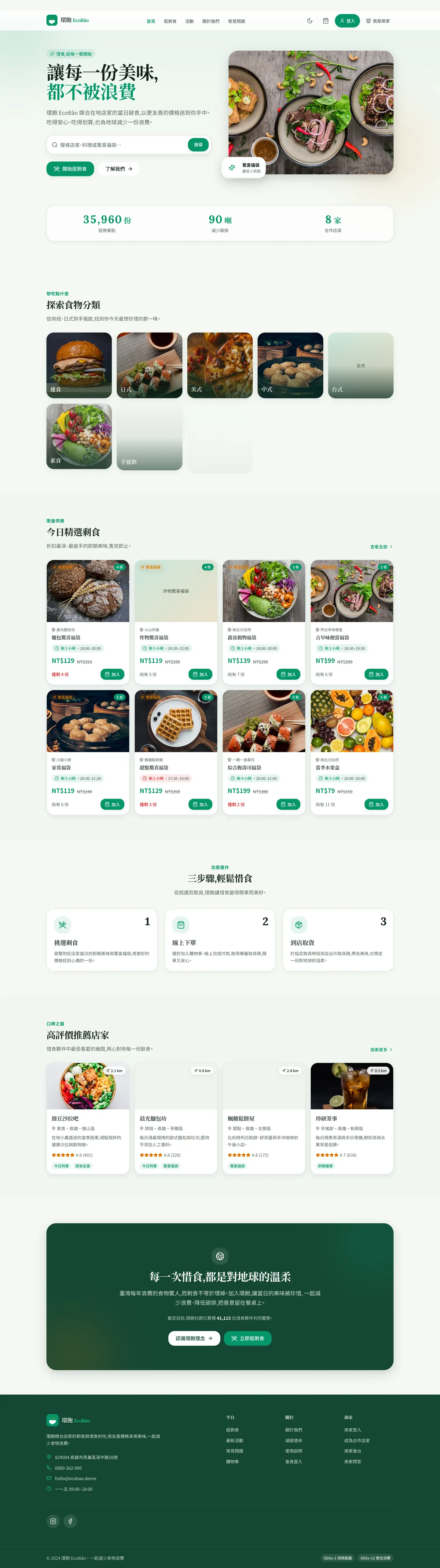
EcoBǎo shopper home, full page — food-saving hero and search, impact counters, category tiles, discounted surplus cards, a three-step explainer and top-rated stores
The shopper landing page end to end. The three impact counters are not operating data — getImpactStats() derives them live from the eight seeded stores at 2.5 kg CO₂ per meal. The few flat-green tiles are SmartImage falling back to the brand placeholder when an Unsplash image does not arrive in time; a real behaviour, not a capture glitch.
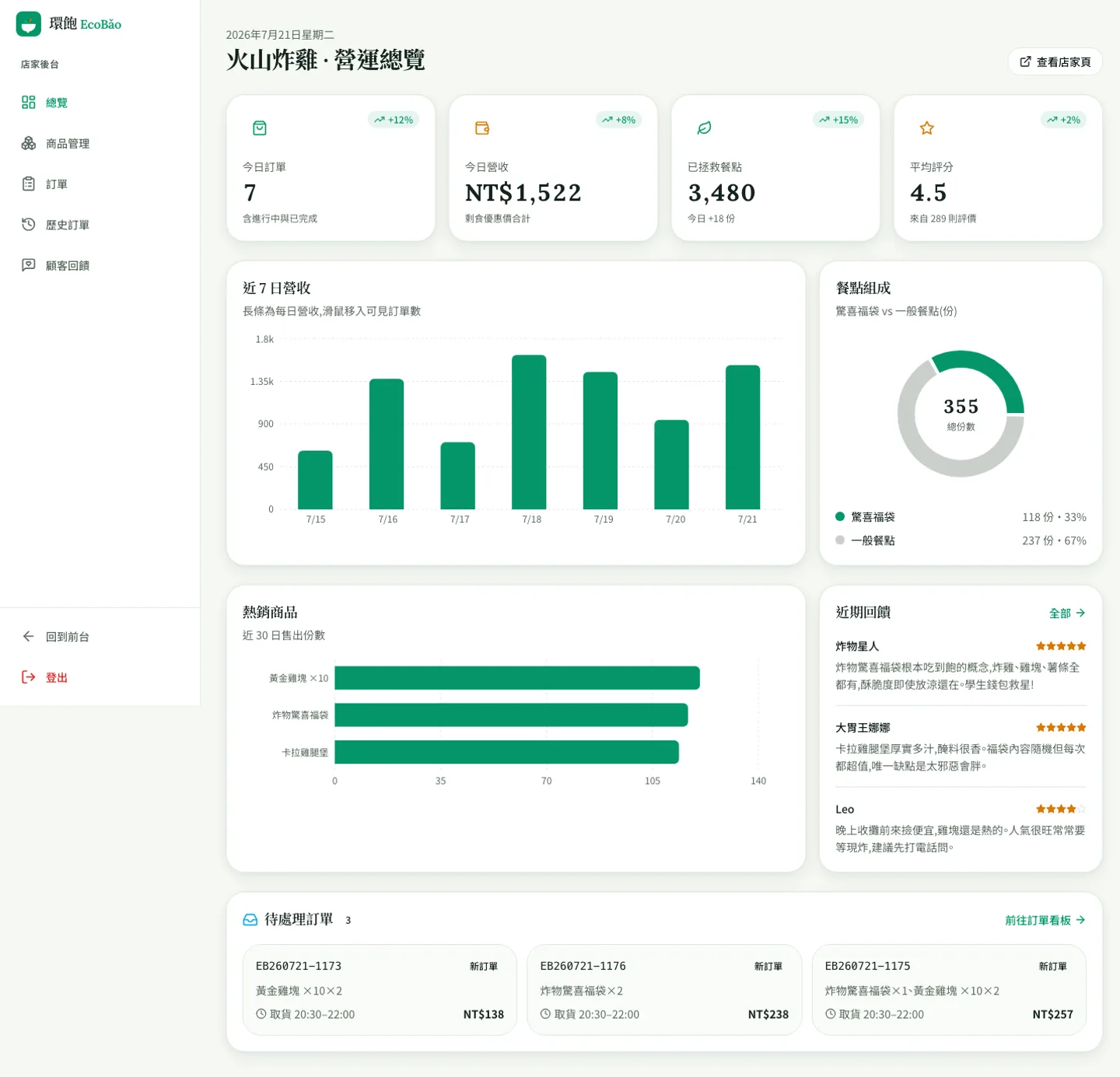
Merchant back-office overview: four KPI cards (today’s orders, revenue, meals rescued, rating), a 7-day revenue bar chart, a surprise-bag share donut, a top-products bar list, recent reviews and pending orders
The merchant overview — the platform’s other face. The KPIs, the 7-day bars and the top-product ranking are all derived from one deterministically generated order fixture, so the numbers reconcile with each other; the +12% / +8% trend badges, by contrast, are hard-coded illustrative values with nothing behind them. The charts are recharts; everything else on the screen is a self-built Tailwind component, with MUI, Ant Design, Bootstrap and styled-components all gone from the dependency list.
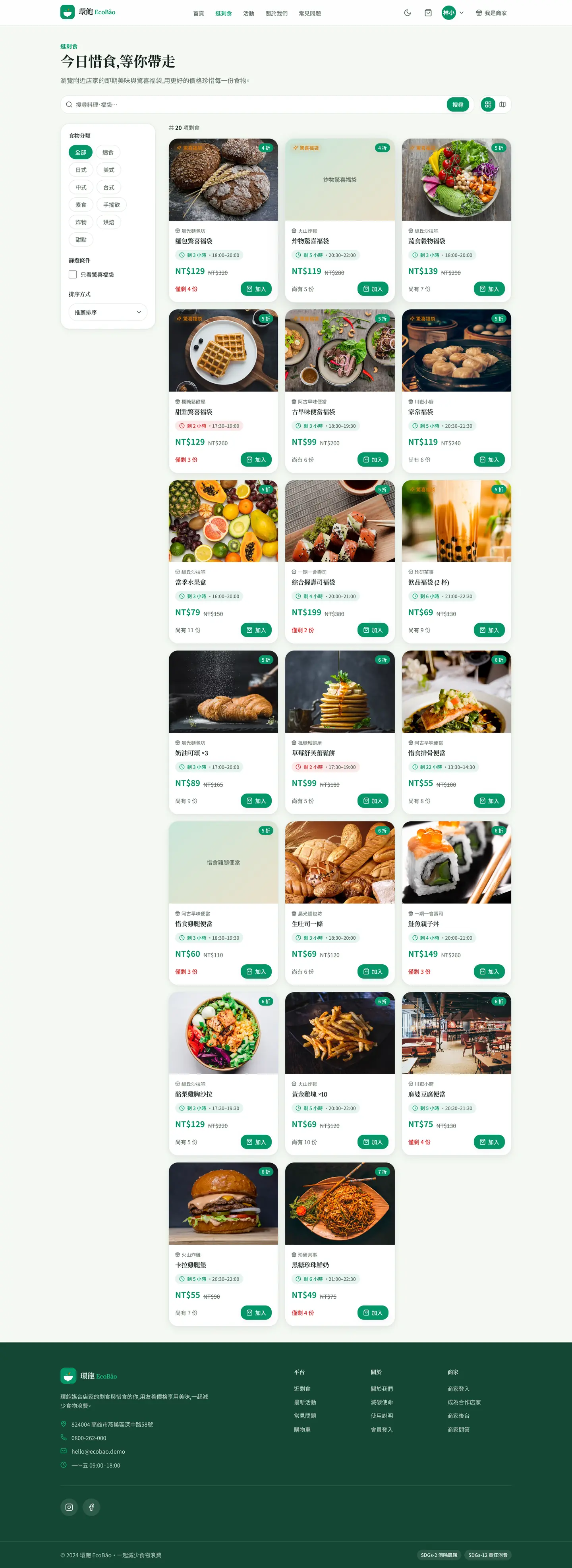
Browse page: category filters and a surprise-bag-only toggle on the left, a sort dropdown, and 20 surplus-item cards showing original price, deal price, portions left and pickup window
Browse: all 20 seeded listings under category filters, a surprise-bag-only toggle and sorting. Every card carries original price, deal price, portions left and the pickup window — for surplus food the time pressure *is* the core information, so it sits on the card rather than the detail page.
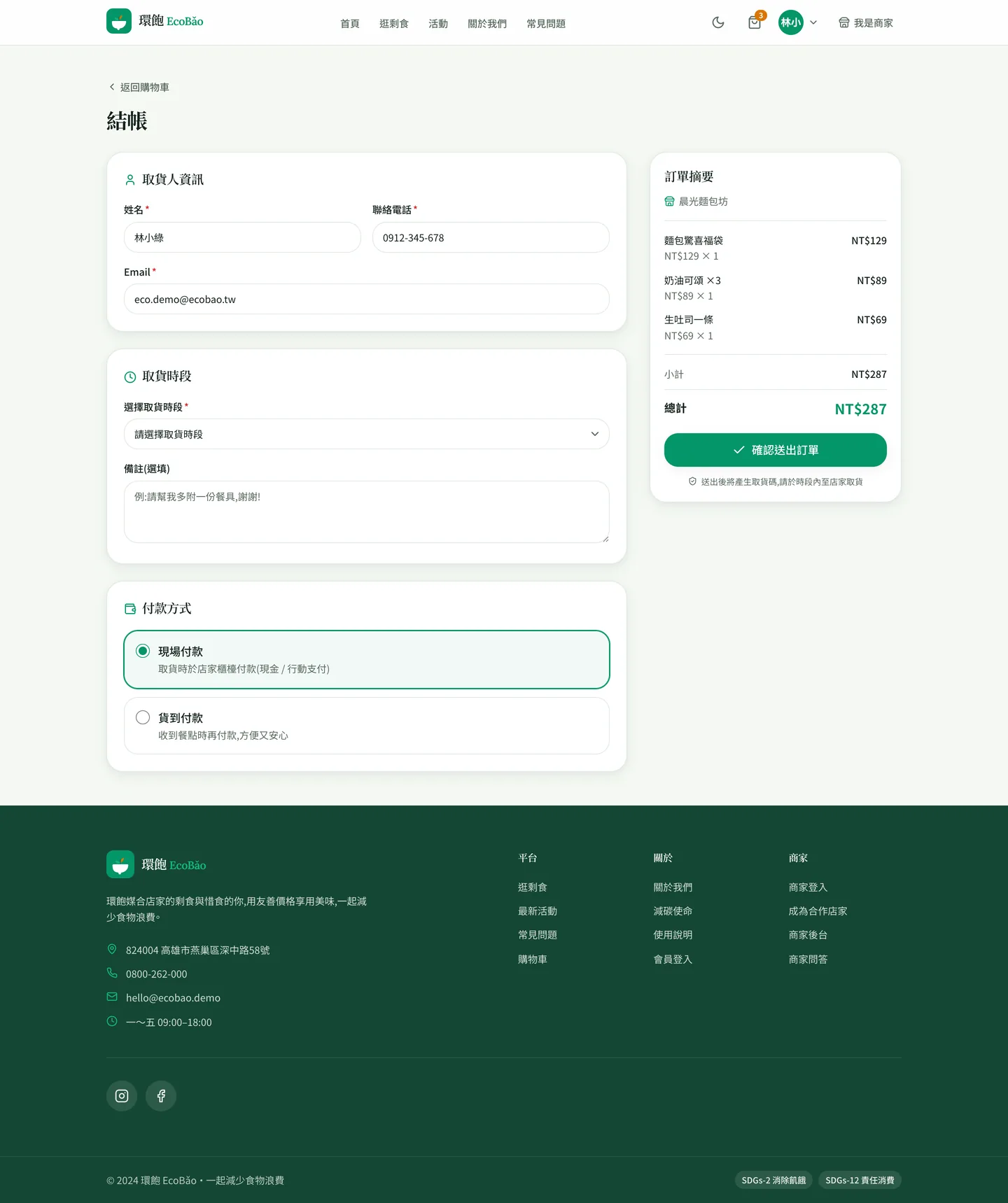
Checkout: a pickup-contact form prefilled with name, phone and email, a pickup-window select, pay-at-pickup / pay-on-delivery radios, and an order summary of three items totalling NT$287
Checkout. The three line items and the NT$287 subtotal are not staged: the capture script really clicked add-to-cart three times on the store page, and the state carried here through localStorage. The pickup contact is prefilled from the demo account. No backend takes part — the 372-line mock API in src/lib/api.js wraps fixed fixtures in a delayed async façade.
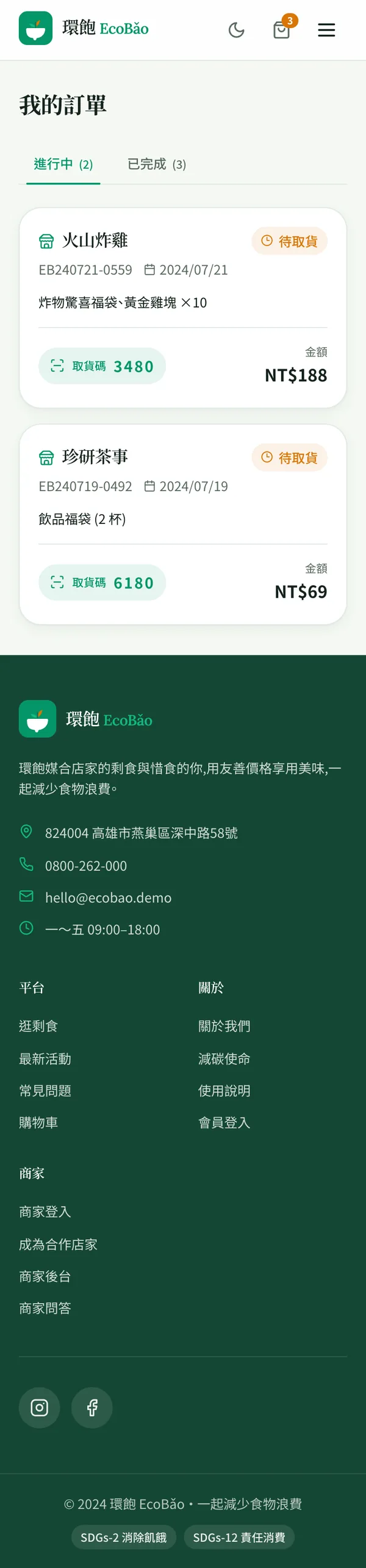
“My orders” at 390px wide: in-progress (2) and completed (3) tabs, two order cards carrying pickup codes and totals, above the dark-green footer
The same orders page at 390px. The whole project has exactly one stylesheet, src/index.css — there is no second mobile sheet, just the same Tailwind tokens reflowing. The pickup code is this flow’s physical deliverable: you read it out at the counter, and that is where online hands off to offline.
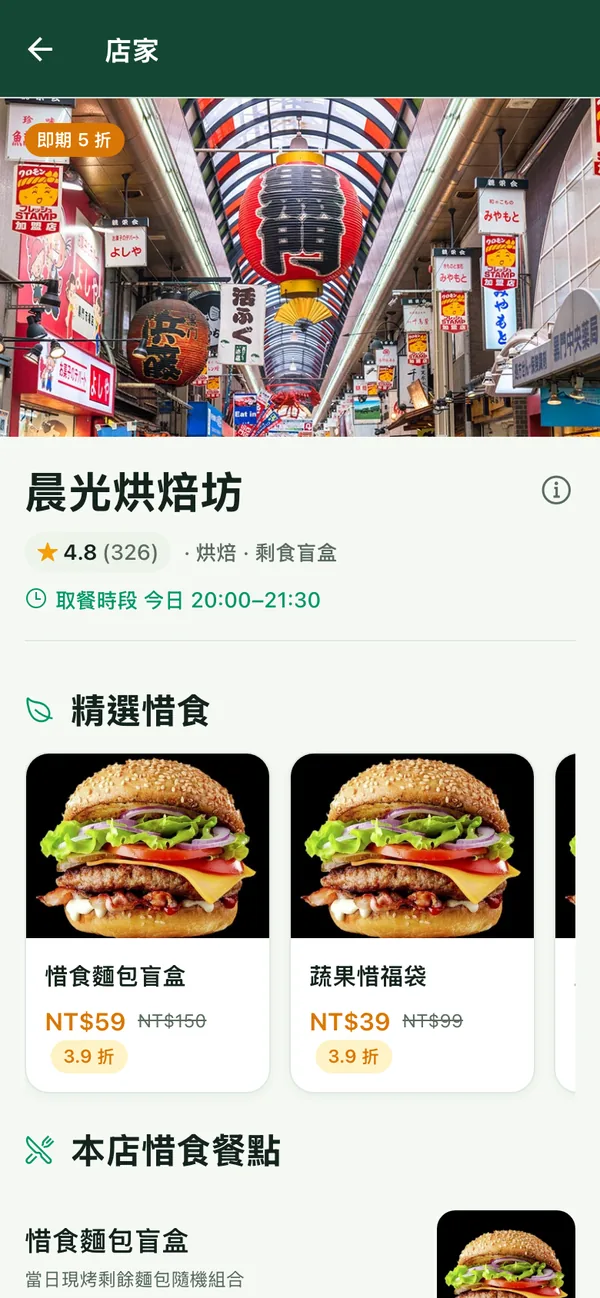
Store screen in the Expo React Native app: a 50%-off badge, a 4.8 (326) rating, today’s pickup window, and a horizontally scrolling rail of discounted surplus items
The store screen in the Expo (React Native) app. Two things stated plainly: this is a web render from `expo export --platform web`, not an iOS or Android device capture — and in that repo every store still shares one market photo and every product one stock burger image. The placeholders were not swapped out for the shot.
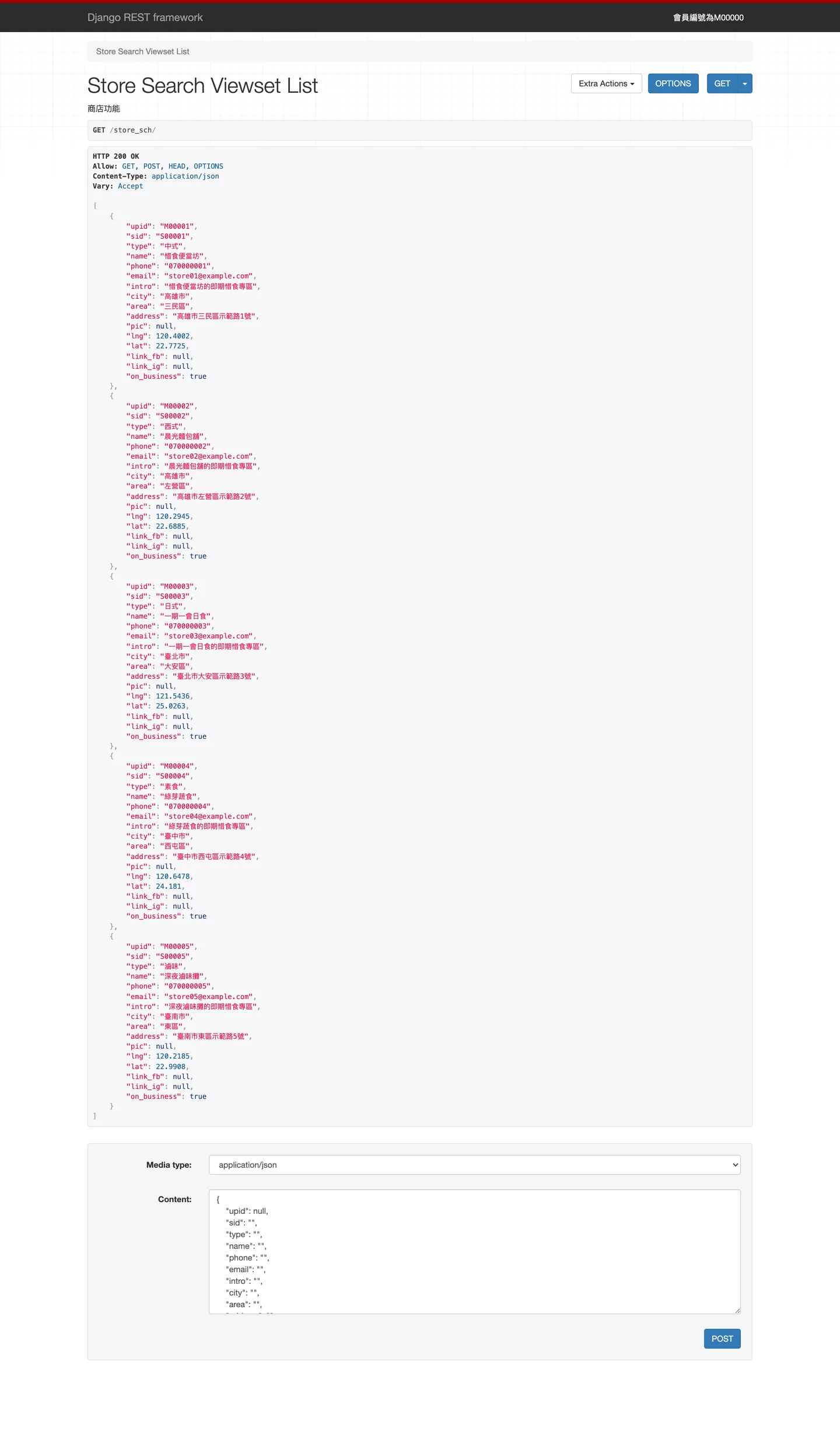
The DRF browsable API showing GET /store_sch/: HTTP 200 and JSON for five seeded stores with upid, type, city/area, address and lng/lat coordinates
The DRF browsable API: GET /store_sch/ carrying a real JWT returns the five seeded stores, lng/lat included — written by Google Geocoding at registration. The project authenticates by JWT only, with no session login, so a token-less browser simply gets a 401. Almost everything else in this backend is a POST-only @action that no screenshot can reach; that is what the five diagrams below are for.

09 / ARCHITECTURE DIAGRAMS

Every diagram below is derived from the project's actual source; each node traces back to a real file. They are wide — scroll sideways, or click to open the full-size SVG.

Order state machine: pending → accepted → ready-for-pickup → completed, with cancel and hard-delete terminal paths; every transition labelled with its POST endpoint and the line in order/views.py
The order lifecycle — the half the REST surface hides. order_order.status is a CharField(50) with no choices, and all five states are Chinese string literals. The arrows are intent, not enforcement: every action except /order/delete/ does a bare Order.objects.get(oid=…) and overwrites the status without checking the caller owns the order, so any state can jump to any state. complete_time is never written by any code path either.
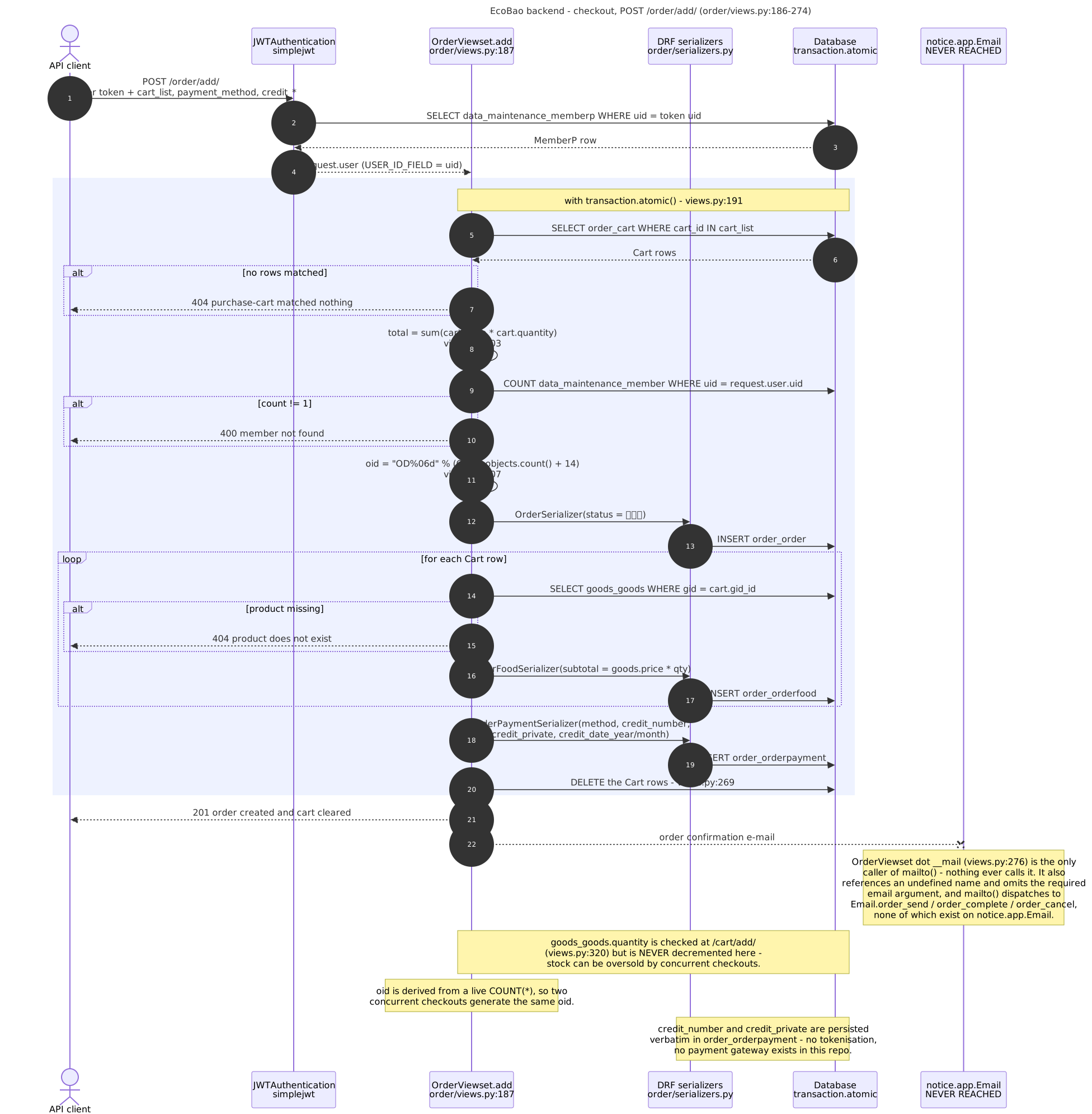
Sequence diagram of POST /order/add/: JWT resolves the user, then inside transaction.atomic the cart is read, totals summed, an oid generated, order/line/payment rows inserted and cart rows deleted — with the never-called mail branch marked dead
The system’s most important write, POST /order/add/, walked step by step against order/views.py:186–274. The body sits inside transaction.atomic, but three things no transaction can save it from: oid comes from a live COUNT(*) (two concurrent checkouts collide on the same id), stock is validated back at /cart/add/ and then never decremented here, and the card number and CVC land verbatim in order_orderpayment. The branch to notice.app.Email on the right is dead — nothing calls __mail(), so e-mail notification was never actually wired up in this codebase.
API permission map: SimpleRouter’s 13 registrations and four explicit paths grouped into an AllowAny anonymous tier, an IsAuthenticated member tier, a store-owner tier guarded inside the view body, and the Django admin — with leaking nodes dashed
The whole API surface sorted by what actually guards each route, not by which module it lives in. Tier three is the one to read: store-owner identity is not enforced by a permission class at all but hand-written inside the view body as Store.objects.filter(upid_id=request.user.uid).count() == 1. The dashed nodes are where it leaks — goods upload/change is declared IsAuthenticated | AllowAny, and that OR waves anonymous callers straight through.
Core domain ER: member, store, opening hours, goods, review, cart, order, order line, payment and cancellation tables with their real column names and PK/FK relationships
The core domain ER. Table and column names were read out of the running demo.sqlite3 (PRAGMA table_info / foreign_key_list) and cross-checked against models and migrations, so the figure shows the columns the database actually has rather than the ones merely declared. The design’s costs are visible at a glance: store.upid_id is both PK and FK (one store per member), price and quantity are stored as text, and order_ordercheck has a table and a migration but no code that ever reads or writes it.
Django 4.1 + DRF architecture: entry points, the middleware chain, URL routing, DRF authentication and permission defaults, four business apps, outbound Google Geocoding and in-process geopy, the MySQL/SQLite swap, and the inert components drawn dashed
How Django 4.1 + DRF is actually wired: middleware order, SimpleRouter’s 13 registrations, the JWT defaults (HS256, USER_ID_FIELD=uid, a 60-minute access token), the outbound Geocoding call and in-process geopy distance work, and MySQL versus SQLite chosen by settings module. The four dashed nodes are declared but inert — asgi.py has no async consumers, CsrfViewMiddleware is commented out, and the notice/ mail module is not in INSTALLED_APPS. There is no Celery, no queue and no scheduler anywhere in this repo: every unit of work runs synchronously inside the request thread.

NEXT

Four Times for Cook — AI Recipe & Health Platform